
My neighbor Deena ordered a desk lamp based on the Amazon listing alone, set it up in an afternoon, and messaged me two days later saying the clamp had left scratches in her desk and the arm would not stay where she pointed it. She was frustrated, and honestly, she was not wrong to be. The listing is cheerful and the rating is high, but Amazon product pages are not designed to tell you the ways a product might disappoint you specifically. That is what this review is for. I have been using the Pzloz LED Desk Lamp for Home Office for several months now, I have put it through conditions the listing does not mention, and I want to give you the unvarnished version before you decide.
Fair warning upfront: I think this lamp is genuinely good. At 4.7 stars across more than 3,300 reviews it has earned its reputation. But there are at least four things the listing glosses over that matter depending on your specific setup, and a few setup mistakes that cause most of the one-star reviews. I will cover all of them.
The Quick Verdict
A well-built clamp lamp that earns its rating, but only if your desk edge is thin enough for the clamp and you take five minutes to position the arm correctly before judging it.
Amazon Check Today's Price →Stop squinting at a screen lit by a ceiling fixture that was never designed for desk work.
The Pzloz architect lamp puts directional, adjustable light exactly where your eyes need it. Dual color temperatures, memory function, and a USB charging port built into the base. Check today's price and see if it fits your desk.
Amazon Check Today's Price on Amazon →What the Listing Does Not Tell You About the Clamp
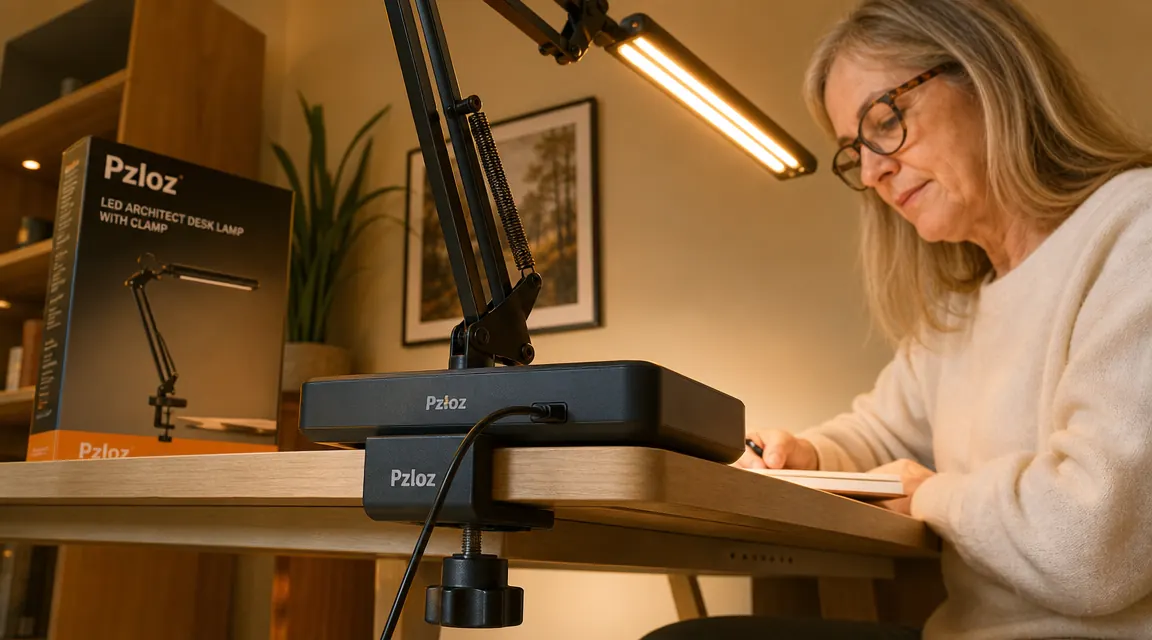
The clamp is the make-or-break detail for this lamp, and the listing buries the spec that matters most. The Pzloz clamp has a maximum jaw opening of roughly 2.2 inches. That number sounds arbitrary until you start measuring things. A standard IKEA Linnmon table top is about 1.2 inches thick. A solid wood butcher-block desk surface can easily be 2.5 to 3 inches thick. The Pzloz will not fit that second desk, period. If you have a thick standing-desk surface, a chunky farmhouse-style table you repurposed as a desk, or a desktop that sits on top of a frame that adds extra thickness at the edge, measure carefully before ordering.
The second thing nobody mentions: the clamp's protective rubber pads. They are there to prevent scratches, which is good, but they need to be checked on high-gloss or lacquered surfaces. If your desk has a slick coating and you overtighten the knob, the rubber can leave a faint impression over time. The fix is simple. Do not overtighten. The clamp holds at about two-thirds of its maximum tightness on most desks. Snug is enough. Deena's scratches came from overtightening on a lacquered surface and then sliding the clamp slightly to reposition it. If you need to move the clamp, loosen it first, reposition it, then retighten. That step prevents almost every scratch complaint in the reviews.
The third clamp point: it works surprisingly well on desks with a front lip or beveled edge. I was worried mine would not seat flush because the front edge of my desk has a slight chamfer. The clamp accommodates it because the jaw is wide enough to reach past the chamfer to the flat underside of the top. Worth testing before you assume it will not work.
The Arm: How Stiff Is It Really, and Does It Sag?
Flexible-arm lamps have a recurring problem: the joints loosen over time and the arm droops toward whatever you are working on. This is the thing I wanted to know before buying and could not find a clear answer about. So here is mine, after several months of daily repositioning: the Pzloz arm has held its position without any perceptible sag. I adjust it multiple times a week. The ball-and-socket style joints at the pivot points are firm enough to stay where you put them but loose enough that you can reposition with one hand without the whole lamp moving.
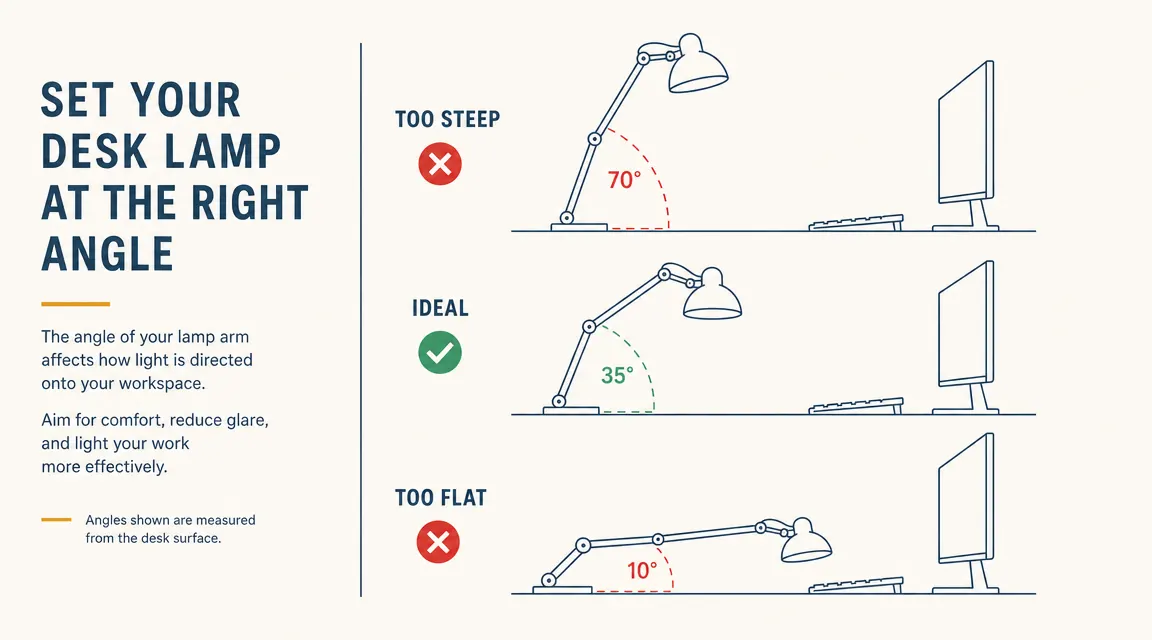
The caveat is positioning. If you extend the arm to its maximum reach and then angle the lamp head sharply downward, gravity is working against the joint more than it would be at a gentler angle. That configuration is also the wrong one ergonomically. You want the lamp head positioned ahead of and slightly above your work surface, not pointed straight down from directly overhead. A 30 to 45 degree angle from horizontal is the sweet spot. At that angle the arm is not fighting itself, and the joints hold cleanly. The chart in this article shows the geometry if you want a visual reference.
Color Temperature Accuracy: What 3000K and 6000K Actually Look Like Here
The Pzloz advertises dual color temperatures of warm white and cool white, which correspond to approximately 3000K and 6000K. Those numbers are useful context but they are not the whole picture. What matters practically is how the light reads in your specific room. In a room with warm-toned walls or wood surfaces, the 3000K setting looks genuinely amber and relaxed. In a room with white walls and cool-gray floors, that same 3000K setting reads as slightly less warm than you might expect because of how the walls reflect it back.
My own experience: the warm mode is warm enough to feel meaningfully different from the cool mode. It is not a subtle difference. When I switch from 6000K to 3000K in the evening, the character of the room changes. The cool mode is closer to daylight than to fluorescent. It does not have that greenish cast that makes some LED fixtures unpleasant. Both modes are clean. For anyone doing color-sensitive work like painting or textile matching, 6000K gives you better color accuracy for evaluation. For writing, reading, and evening work, 3000K at medium brightness is considerably easier on your eyes over several hours.
One genuine limitation I want to name: there is no middle option. The lamp gives you 3000K or 6000K. If you want something in the 4000K range, which is the neutral white that many lighting designers prefer for mixed task and ambient work, this lamp does not offer it. That is a real gap for some users. The BenQ ScreenBar Halo, at a significantly higher price, offers a continuous temperature slider. Whether that gap matters depends entirely on how particular you are.
Most one-star reviews I read came down to two things: overtightened clamp on a slick surface, or the arm set at the wrong angle and then blamed for drooping. Both are avoidable with five minutes of attention.
The USB Charging Port: Honest Amperage Reality
The USB-A port built into the lamp base is listed as a feature but not given a specific amperage in the marketing copy. Here is what you need to know: it outputs at standard USB 2.0 levels, roughly 5V at 0.5A, which means 2.5 watts of charging power. That is enough to trickle-charge small devices. Your phone will charge, but slowly. If you leave your phone plugged in all day while you work it will be fully charged by evening. If you expect it to recover 20 percent in 30 minutes, it will not. This is not a fast-charging port.
Useful applications: keeping wireless earbuds charged at the desk, topping off a small stylus or drawing tablet peripheral, running a low-power USB desk fan or a small light strip. Not useful for: rapidly charging a modern smartphone, powering a USB hub, running anything that requires more than 5 watts. I use mine exclusively for my stylus and I am satisfied with it. If you want the port to replace a dedicated charging brick, it will disappoint.
The Memory Function: Small Feature, Surprisingly Important
The Pzloz remembers your last color temperature and brightness setting when you switch it off and restores it when you switch it on again. I want to talk about why this matters more than it sounds. Most cheap desk lamps reset to full brightness and the coldest temperature every time they are powered on. That means every morning, your first task is re-dialing the lamp to where you want it. Over a week it becomes an unconscious irritation. Over a month you stop bothering and just live with whatever the default is.
The memory function removes that friction entirely. I set my preferred configuration once, in the first week, and have not thought about it since. The lamp wakes up in warm mode at about 60 percent brightness, which is exactly what I want for morning work. When I need the cool mode for precise color work I switch it, use it, switch back. The lamp remembers my warm setting again for the next day. It sounds like a minor convenience but it is actually the difference between a lamp you actively enjoy using and one you just tolerate.
The Touch Controls: Reliable, With One Quirk
The controls are a small touch panel on the lamp base with two buttons: one for power and brightness cycling, one for temperature toggle. They are clean and responsive. The one quirk to know: they are sensitive enough that brushing the base accidentally while reaching for something on your desk will sometimes trigger them. If you keep the lamp base in an active zone of your desk where your hands pass frequently, you will occasionally find the lamp has changed its setting without you intending to. The fix is simply to position the base somewhere out of your direct reach path, which is also better ergonomically since the lamp arm is long enough to reach your work area from a more peripheral base position.
The power-off confirmation is also slightly unusual. A single tap dims the lamp by one step. A longer press turns it off. New users sometimes find themselves accidentally cycling through brightness levels when they mean to shut the lamp off. You get used to it in a day or two, but it is worth knowing upfront so the first session is not confusing.
The Cord and Cable Reality
The power cord runs along the outside of the arm rather than through an internal channel. This is the most common aesthetic complaint in the reviews, and I share it. The cord clips to the outside of the arm with small plastic guides and arrives at the base where it exits to your wall outlet. On a desk where visual tidiness matters, you will want to manage that cord. A small velcro tie or a few cable clips bring it into line quickly. I routed mine along the back edge of my desk to the power strip and it is essentially invisible in normal use. It takes five minutes to sort out and then it is done.
One practical note on cord length: the lamp ships with a cord that works for a desk against a wall with a nearby outlet. If your desk is in the middle of a room or far from an outlet, measure and factor in an extension cord before setting up. The cord is not unusually short, but it is not unusually long either. Standard length, plan accordingly.
What I Liked
- Firm pivot joints that have held position through months of frequent repositioning without any perceptible sag
- Memory function genuinely works and removes the daily friction of re-dialing settings from scratch each morning
- Clean, flicker-free LED output in both color temperatures with no greenish cast
- Large knob-style clamp tightener lets you attach, detach, and move the lamp between surfaces in seconds without tools
- Touch controls are responsive and intuitive after the first day, with a minimal footprint on the desk surface
- Dual temperatures serve completely different tasks well, and the difference between modes is distinct and useful
Where It Falls Short
- Clamp jaw maxes out at about 2.2 inches, which excludes thick butcher-block surfaces and some standing desk frames
- No middle color temperature option between 3000K and 6000K, which is a real gap for users who prefer 4000K neutral white
- USB charging port outputs at trickle-charge speed only, not suitable for quickly charging modern smartphones
- Power cord runs along the outside of the arm rather than through an internal channel, requiring five minutes of cable management to look tidy
- Touch controls are sensitive enough to be accidentally triggered when your hand passes the base, requiring a thoughtful placement decision
Who This Is For
The Pzloz is a strong match for home office workers who need one lamp that serves both focused task work and relaxed reading or writing without buying two separate fixtures. It suits anyone in a room where the overhead lighting is harsh, distant, or poorly angled, which describes most home offices in bedrooms, spare rooms, and corners of living spaces. It is a good choice if you care about the look of your workspace as much as the function. The warm mode at low brightness creates a quality of light that feels considered, not industrial. Your guests will not know it cost so little.
Who Should Skip It
Skip the Pzloz if your desk edge is thicker than two inches. The clamp will not work reliably and you will be in the return queue within a week. Skip it if you need fast USB charging as part of your workflow, or if you need smart-home scheduling or a continuous temperature range. Skip it if your primary task is color-matching work that requires precision above 95 CRI. And skip it if the idea of routing a visible cord bothers you deeply, because that is a real thing about this lamp. For everyone else, the Pzloz earns its rating honestly. I would recommend it to a friend setting up a home office on a sensible budget, and I have. If you want a fuller picture of how this lamp compares to the BenQ ScreenBar Halo and where each one is worth its price, that comparison is laid out in detail in my head-to-head between the Pzloz and the BenQ ScreenBar Halo. And if you are still working out the full lighting setup for your room, the guide on how to light a home office without eye strain covers the room-level thinking that makes any desk lamp more effective.
You now know exactly what you are getting. If your desk edge clears two inches and you want honest, adjustable light without the BenQ price tag, this is the one.
The Pzloz LED architect lamp has 3,303 reviews at 4.7 stars for good reason. Dual color temperatures, memory function, clamp mount, USB port. Check today's price before it moves.
Amazon Check Today's Price on Amazon →